BetterDisplay5.1.1
Display management tool
v5.1.1
27.9 MBscanned clean
Verify your download
Select the file you downloaded to check it against the hash we published — the check runs in your browser, nothing is uploaded.
About
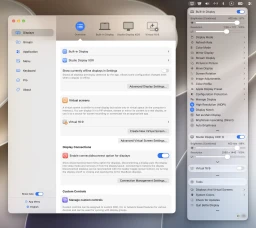
BetterDisplay lets you reshape a Mac’s display setup with custom resolutions, scalable HiDPI modes, brightness controls, and virtual screens, solving the limits of macOS’s standard display settings. It can also soft-disconnect screens, apply configuration and EDID overrides, protect layouts, synchronize displays, and create Picture in Picture windows that keep selected windows or groups visible.
Its controls include XDR/HDR brightness expansion, full dimming to black, color-mode, color-profile, and XDR-preset selection, plus sharpening, geometry, advanced color adjustments, and custom 3D LUTs for displays, PIP windows, and streaming video. Favorite resolutions can be reached from the app menu, a resolution slider, or keyboard shortcuts, while Night Shift can be enabled for a TV and an iPad or monitor can serve as a DIY teleprompter. BetterDisplay provides software and hardware DDC control for brightness, volume, and color, including slider, native-shortcut, and custom-shortcut control; it is the only app with DDC support across modern Macs, including Apple Silicon built-in HDMI and the 2018 Mac mini’s built-in HDMI.
It adds HDMI-CEC controls for volume, mute, power, and inputs on compatible connections, while anchor points preserve natural screen-to-screen movement in adaptive layouts. macOS Shortcuts through App Intents, advanced keyboard shortcuts, betterdisplaycli, a custom URL scheme, HTTP, notifications, and a Control Center-style sidebar with the refreshed Liquid Glass interface support automated and quick workflows. Version 5.1.1 belongs to the v5.x line for macOS 26 Tahoe and macOS 27 Golden Gate; older releases listed are v4.3.7 for Sequoia, Sonoma, and Ventura, v3.5.6, v2.3.9 for Monterey, and v1.4.15 for Mojave, Catalina, and Big Sur.
BetterDisplay suits multi-monitor desks, TV setups, HDR and XDR work, presentation spaces, and anyone needing finer control over an internal or natively connected external display, including notch, HDR, HDCP, and high-refresh support. It is freeware in the System Tools category for macOS on Apple Silicon Macs using the arm64 architecture.
Architecture: Apple Silicon (arm64)
Other architectures
The download button above is the build most devices need. The same release for other processors:
Details
SHA-256
Version history
Does this still work for you?
Badge for your website
Developers can show that BetterDisplay is available on MirrorNest. Copy the code below: the badge links to this page and updates itself.

<a href="https://mirrornest.com/software/betterdisplay-0b88f4af"><img src="https://mirrornest.com/badge/betterdisplay-0b88f4af.svg" alt="BetterDisplay on MirrorNest" height="20"></a>[](https://mirrornest.com/software/betterdisplay-0b88f4af)Reviews
No reviews yet — be the first.
BetterDisplay alternatives

DockDoor
Window peeking utility app

Better Mac Widgets
Live-animated widgets that sit on the desktop

FreeFileSync
Free data backup software to synchronize files and folders

Caffeine
Utility that prevents the system from going to sleep

f.lux
Screen colour temperature controller
Alcove
Utility to add Dynamic Island like features to notch area