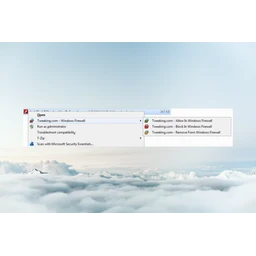
Tweaking.com - (Right Click) Allow, Block or Remove - Windows Firewall (Portable)
A program to easily add, block, or remove programs in Windows Firewall.
v1.0.0
This title isn't mirrored on MirrorNest — see how we source software for why. The button above goes straight to the official publisher.
About
Add, block, or remove Windows Firewall rules for a selected program directly from Windows Explorer’s right-click menu. Tweaking.com - (Right Click) Allow, Block or Remove - Windows Firewall (Portable), published by Tweaking.com, is freeware for Windows in the System Tools category, currently at version 1.0.0.
After its context-menu options are enabled, you can apply an allow, block, or remove action to one executable or to several files together. The utility works with programs ending in .exe or .com, giving users a quicker alternative to managing individual entries through the standard Windows Firewall interface. It is useful for controlling network access for newly installed software, troubleshooting a program’s connectivity, or clearing rules belonging to applications that have been removed.
When allowing or blocking a file, the tool first deletes existing rules that point to the same file path and then creates a single replacement rule. An allow rule covers every protocol and port and permits edge transport, while a block rule covers all protocols and ports; the remove command deletes rules associated with the selected program.
This portable release is set up by extracting its files, running Right_Click_Options.exe from that folder, and leaving the extracted folder in place because the added menu entries depend on it. The initial setup adds the commands for .exe and .com files, making the utility suited to Windows users who regularly adjust application firewall access from Explorer.
Details
Does this still work for you?
Reviews
No reviews yet — be the first.
Tweaking.com - (Right Click) Allow, Block or Remove - Windows Firewall (Portable) alternatives

dotMemory Unit Standalone Launcher
Effective memory usage in .NET applications with dotMemory Unit
GamebarHandler
Gets rid of those pesky 'open ms-gamebar' and 'open ms-gamingoverlay' popups.

ShareX
ShareX is a free and open-source application that enables users to capture or record any area of their screen with a single keystroke. It also supports uploading images, text, and various file types to a wide range of destinations.

cerebro-es (Install)
elasticsearch web admin tool

CPUID CPU-Z
System information software

Vantage
Vantage